Review
Gusto payroll review (2026): pricing, real cost & verdict
Gusto is a full-service payroll and light-HR platform for US small businesses. It files and pays federal, state and local payroll taxes automatically on its three employee plans, includes benefits administration and employee self-onboarding, and prices transparently as a monthly base plus a per-person fee (Simple $49 + $6/person, Plus $80 + $12, Premium $180 + $22, plus a contractor-only plan at $35 + $6). After I set up a real account and reviewed it hands-on, Gusto scores 8/10: the default pick for most small US teams, held back by US-only employee payroll, an HR layer that thins to paid add-ons, and a support reputation that wobbles when something goes wrong.
Pros
- Full-service payroll on all three employee plans (Simple, Plus, Premium): files and pays federal, state and local payroll taxes automatically
- Transparent base-plus-per-person pricing published in full, no contract, and no per-payroll-run charge
- Genuinely smooth setup: a clear, time-estimated onboarding wizard and strong employee self-onboarding, from the Simple plan up
- Cheaper contractor-only plan ($35/mo, currently $0 base for six months) for teams without W-2 staff
- Can pay international contractors in 120+ countries via an add-on, even though employee payroll is US-only
Cons
- Gusto's own payroll is US-only; employees abroad are covered only through a resold Remote-powered EOR (Gusto Global) in about seven countries
- Customer support is the most common complaint in user reviews, usually when a tax filing goes wrong
- The per-person fee compounds as headcount grows, faster on Plus ($12) and Premium ($22) than Simple ($6)
- Real-bill drivers such as next-day pay, HR tools and state tax registration are paid add-ons, not included
- Dedicated support, certified HR and performance management are gated to the top Premium tier
Is Gusto worth it?
The scariest line item a small business owns isn’t the rent, it’s the paycheck that has to land on the right day, with the right tax withheld, every single time, because it’s other people’s trust riding on your admin. Gusto is a full-service payroll and light-HR platform built for US small businesses: it calculates pay, then files and pays your federal, state and local payroll taxes automatically, and folds in benefits administration and employee self-onboarding on top. For most small US teams it is the default choice, because it removes the highest-risk admin (payroll tax filing) without the weight or price of an all-in-one HR suite. Whether HR automation is worth it at your size is the prior question, and payroll tax filing is usually the strongest yes. The pricing is unusually honest for the category: a published base fee plus a per-person fee, no contract, and unlimited payroll runs.
Three things hold it back. Its own payroll is US-only (a resold EOR reaches only about seven other countries), so hiring more widely abroad means a different tool; customer support is the recurring complaint in user reviews when something goes wrong; and the HR layer is light by design, with the tools that drive a real bill (next-day pay, HR resources, dedicated support) sold as paid add-ons or gated to Premium. After I set up a real Gusto account and reviewed the product hands-on, it lands at 8/10: a smooth, transparently priced payroll platform that drops a point on support and a point on how quickly the HR side turns into add-on spending. For the US small team it’s built for, Gusto remains hard to beat.
What I could and couldn’t test: I set up and onboarded a real Gusto account and verified its pricing first-hand, but I did not run a live payroll for a real workforce (that needs genuine US company tax details). For the payroll-run and long-term-support experience I lean on Gusto’s documented behaviour and the consensus of independent reviews, and I’ve scored only what that evidence supports. I’d rather scope that openly than pretend otherwise.
What Gusto is, and who it’s for
Gusto sits in the payroll-first corner of the HR-software market. It is pitched at small and growing US businesses that need to run real payroll, file payroll taxes, and handle basic benefits and onboarding, all from one tool, without hiring a payroll specialist or buying an enterprise platform. Gusto says it is trusted by more than 500,000 businesses.
It is the right shape for:
- A small team running W-2 payroll in one state that wants tax filing handled for them.
- A growing team adding multi-state staff, time tracking or faster pay.
- A business paying 1099 contractors (including overseas contractors) that wants compliant payments and filings.
It is the wrong shape for a company hiring employees abroad (you need an employer of record instead) or one that wants payroll, IT and device management unified in a single heavier platform.
Gusto’s payroll: what it does well
Payroll is the core, and it is the strongest part of the product. The headline is full-service tax filing: Gusto calculates pay, then files and pays federal, state and local payroll taxes on your behalf, which is the single biggest reason small teams use it instead of a spreadsheet and a calendar reminder.
The mechanics that matter day to day:
- Unlimited payroll runs on every plan, so a correction run, a bonus run or an off-cycle payment costs nothing extra.
- Payroll on AutoPilot, which runs scheduled payroll automatically once it’s set up.
- Direct deposit or printable cheques, with faster-pay options (next-day, same-day, instant) available as add-ons or on higher tiers.
- Contractor payments and 1099 filings, including a cheaper contractor-only plan for teams with no employees.
- Multi-state payroll on the Plus tier for teams hiring across state lines.
One genuinely useful nuance most summaries miss: Gusto can pay international contractors in 120+ countries through its global-contractor add-on, with no monthly per-contractor fee (just a per-payment charge to US bank accounts). So “US-only” is precise rather than absolute: it applies to employee payroll, not to paying overseas freelancers.
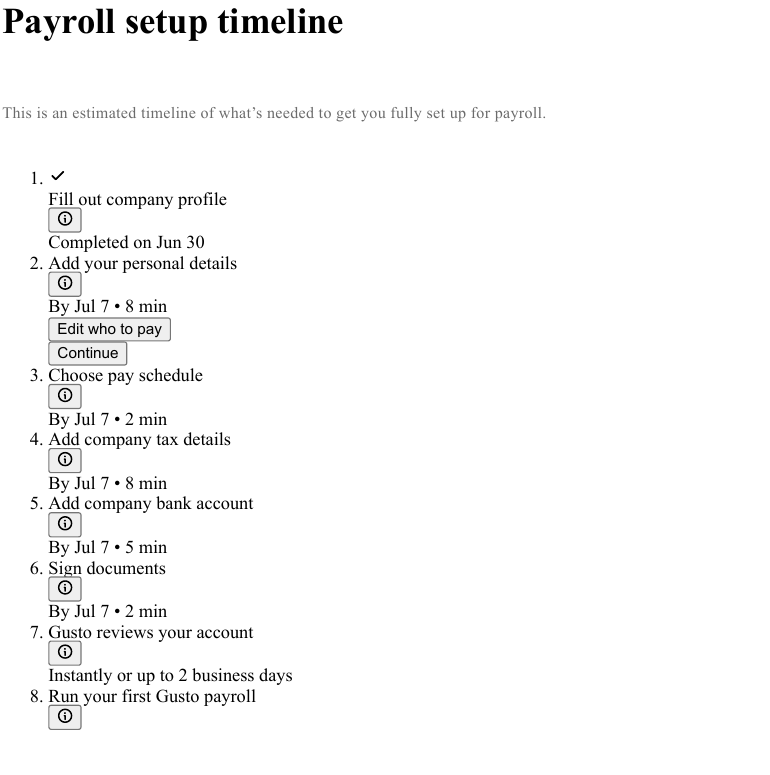
When you set up a fresh account, the path to that first payroll is a timed checklist: company profile, personal details, pay schedule, company tax details, bank account, document signing, a Gusto account review, then your first run, each step carrying its own time estimate. It makes setup feel scoped rather than open-ended, which is exactly what a non-specialist needs.
HR, benefits and onboarding
On top of payroll, Gusto adds the light-HR layer a small team actually uses. Employee self-onboarding is a standout: a new hire enters their own details, completes their forms, and sets up direct deposit themselves, so the admin doesn’t land on you. Benefits administration is built in from the Simple plan up.
The benefits and HR catalogue (most of it sold as add-ons on top of the base plan):
- Health insurance through licensed brokers (you pay only the premiums, with no Gusto administration fee), plus an option to integrate an existing broker.
- Workers’ compensation, life and disability cover.
- Tax-advantaged accounts: HSAs, FSAs, dependent-care FSAs and commuter benefits, with one annual service charge covering all four account types.
- 401(k) retirement plans that sync with payroll.
- HR tools on the higher tiers or as add-ons: certified HR experts and compliance alerts, performance reviews, goal tracking and surveys.
This is light HR, not a full HRIS. It covers hiring, onboarding, benefits and basic people management well; it is not trying to be a performance-and-talent platform.
Integrations
Gusto connects to the tools a small business already runs, which keeps payroll data flowing into the books without re-keying. The most-used integrations are the accounting ones: QuickBooks Online and Xero sync payroll entries directly, and there is a broader marketplace covering time tracking, expense and productivity tools. For most small teams the accounting sync is the one that matters, and it is well supported.
Reporting and compliance
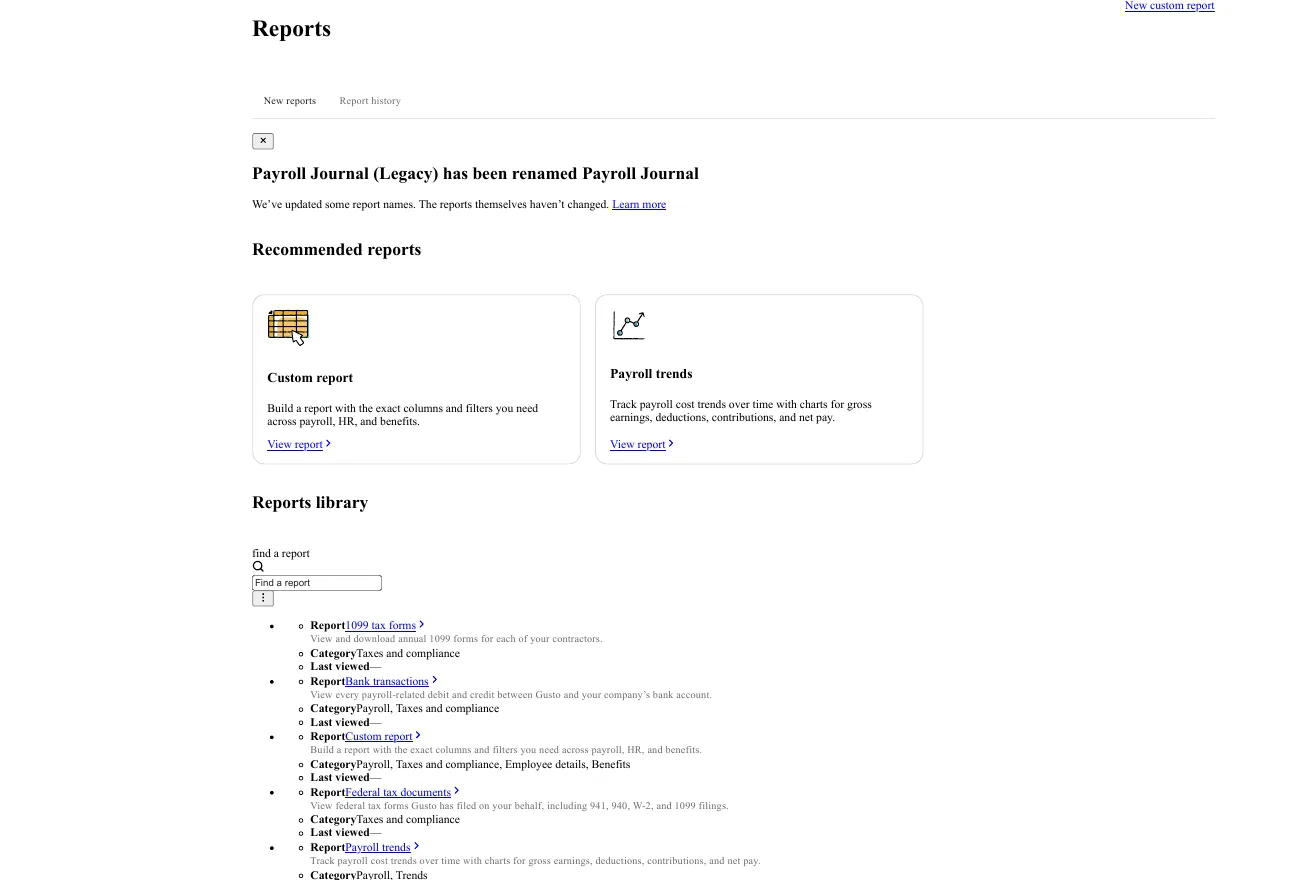
The reporting side is broader than a small team usually needs, which is the right direction. From inside the account you can pull paystubs, payroll-trend charts (gross earnings, deductions, contributions and net pay), bank-transaction reports, and a full library of the tax forms Gusto files for you: federal 941, 940, W-2 and W-3, 1099s for contractors, and state withholding and unemployment documents. For a non-specialist, having the filed forms sitting in one place is the paper trail that actually matters at tax time.
Switching to Gusto mid-year
If you move to Gusto partway through the tax year, the work most reviews skip is the year-to-date catch-up: your prior payroll history (wages paid, and taxes already withheld and remitted) has to be entered so your year-end W-2s come out correct. Gusto’s setup flow is built to collect this, and the Premium plan bundles guided payroll migration and account setup if you’d rather have it handled than do it yourself. It isn’t unique to Gusto, but it’s the step to plan for: set aside an afternoon for data entry, and have your previous provider’s year-to-date reports to hand before your first run.
What happens if you leave Gusto
Leaving Gusto is procedurally easier than leaving most payroll providers, with one timing rule that matters. In its favour: Gusto runs month to month with no contract, so there’s no lock-in term to buy out, and you can pull your filed tax forms and payroll reports (W-2s, 941s, 940, payroll-trend and bank reports) from the reports library covered above. The timing rule is the mirror of the mid-year switch into Gusto: if you leave partway through the tax year, your new provider needs Gusto’s year-to-date wage and tax totals to produce correct year-end W-2s, so export those before you cancel rather than after.
One caveat I’ll flag honestly: I set up and reviewed a real account but did not run a cancellation, so I can’t yet confirm first-hand how long filed forms stay accessible in a closed or downgraded account. Before you switch, download your YTD reports and filed forms while the account is active, and confirm the retention terms with Gusto. When I verify the offboarding directly, I’ll report exactly what stays reachable.
Gusto pricing: how much does Gusto payroll cost in 2026?
Pricing is where Gusto is clearest, and it is the section worth reading closely. Gusto charges a monthly base fee plus a per-person fee for everyone you pay, across a contractor-only plan and three full plans. These are Gusto’s published list rates, captured June 2026; a real invoice can differ once a promotion or an add-on applies.
| Plan | Monthly base | Per person | Built for |
|---|---|---|---|
| Contractor-only | $35 (currently $0 for the first 6 months) | $6 / contractor | Teams paying only 1099 contractors |
| Simple | $49 | $6 | Small teams on single-state payroll |
| Plus | $80 | $12 | Growing teams: multi-state, time tracking |
| Premium | $180 | $22 | Teams wanting dedicated support and HR |
Base + per-person pricing, defined: your monthly Gusto bill is two numbers added together. A flat base fee for the plan you pick, and a separate per-person fee for each employee or contractor you actually pay that month. Pay nobody one month and you owe the base only. The total rises with headcount, not with how often you run payroll: unlimited payroll runs are included on every plan.
The contractor-only plan is the outlier. Because it charges the same $6 per head as Simple, the only difference for a pure-contractor roster is the base ($35 versus $49), so it stays cheaper right up until you hire your first W-2 employee, when you move to one of the main plans.
What each plan includes
Each tier adds capabilities on top of the one below it. Picking the right Gusto plan comes down to spotting the single capability that forces you up a tier, then buying that tier and nothing above it.
| Capability | Contractor-only | Simple | Plus | Premium |
|---|---|---|---|---|
| Contractor (1099) payments and filings | Yes | Yes | Yes | Yes |
| Full-service payroll tax filing (W-2) | No | Yes | Yes | Yes |
| Benefits administration and self-onboarding | No | Yes | Yes | Yes |
| Single-state payroll | No | Yes | Yes | Yes |
| Multi-state payroll | No | No | Yes | Yes |
| Time tracking (or add-on on Simple) | No | Add-on | Yes | Yes |
| Next-day pay (or add-on on Simple) | No | Add-on | Yes | Yes |
| Dedicated adviser, certified HR, performance | No | No | No | Yes |
| Priority support | No | Add-on | Add-on | Yes |
Two of the headline reasons to jump to the Gusto Plus plan (time tracking and next-day pay) are also sold as add-ons on Simple, and priority support is an add-on below Premium. So the upgrade question is rarely “do I need this feature” but “is the add-on cheaper than the next tier for my headcount”.
The add-ons that change your real bill
This is the part a plan card hides, and the part most reviews skip. Gusto’s headline price is the base plan; the line items below sit on top, and they are why a real invoice rarely matches the sticker. These are Gusto’s published add-on rates (June 2026); most add-ons are not available on the Contractor-only plan, and Premium customers may get some of them discounted or waived.
| Add-on | Price | Available on |
|---|---|---|
| Next-day pay | $15/mo + $3/person | Simple (included on Plus) |
| Same-day pay | $90 per payroll | All plans |
| Instant pay | $100 per payroll | All plans |
| Time & Attendance Plus | $6/person (free trial first) | Simple (included on Plus) |
| Priority Support | $30/mo + $3/person | Simple and Plus |
| HR Resources (certified HR, compliance alerts) | $50/mo + $5/person | Simple and Plus |
| Performance reviews and goal tracking | $3/person | Simple |
| Global contractor payments (120+ countries) | No monthly fee; $5 per US-bank payment | All plans |
| State tax registration (new state) | Varies by state | All plans |
| R&D tax credits | 15% of identified credits | All plans |
| Health-broker integration | $6/mo per eligible employee | Paid plans |
| Workers’ compensation | From $14/mo | Paid plans |
| Gusto Money Plus | $19/mo | Paid plans |
| HSA | $2.50/mo per participant | Paid plans |
| FSA / Dependent-care FSA / Commuter | $4/mo per participant ($20/mo minimum) | Paid plans |
A $200 annual service charge covers all four tax-advantaged account types together (HSA, FSA, dependent-care FSA, commuter). It sits on top of the per-participant monthly fees listed above, so it is one admin fee for the whole set, not $200 per account type. One caveat on the faster-pay add-ons (next-day, same-day and instant pay): these can be subject to eligibility checks tied to your payroll history rather than switched on instantly.
What Gusto costs per employee: three worked examples
Most reviews quote the base price and stop. Here is the real monthly cost worked out, using Gusto’s published rates (treat as illustrative; your promotions and add-ons will move the total):
- Three contractors, no employees (Contractor-only). $35 base + 3 × $6 = $53/mo standard, or $18/mo for the first six months while the base is discounted to $0.
- Five employees, single state (Simple). $49 base + 5 × $6 = $79/mo, with full-service tax filing and benefits admin included.
- Twelve employees, two states (Plus). $80 base + 12 × $12 = $224/mo. Want hands-on HR help too? Adding the Priority Support and HR Resources add-ons (about $66 and $110 a month at this headcount) lands near $400/mo, still below Premium’s $180 + 12 × $22 = $444/mo. At a dozen people, stacking add-ons on Plus is often cheaper than jumping to Premium; the maths flips only as headcount climbs.
Customer support: the weak spot
The product rates well overall on the software-review platforms: on Capterra it holds 4.6 out of 5 across 4,213 reviews, checked July 2026 (Capterra). The sub-scores back that up. Ease of use sits at 4.6, but customer service trails at 4.4, the weakest of its rated dimensions. That gap is the recurring complaint across user reviews: the platform works smoothly until something breaks (a tax-filing error or an incorrect form is the usual trigger), and getting a fast, useful response at that point is where people are let down. Support runs on weekday business hours rather than 24/7, and the higher-touch help (priority support, a dedicated adviser, certified HR) sits on Premium or as a paid add-on.
This is the risk to weigh against the convenience: for routine payroll Gusto is smooth, but if your situation is unusual or a filing goes wrong, budget for the possibility of a slow resolution, and consider the priority-support add-on if support responsiveness is critical to you.
Gusto vs the alternatives
The right alternative depends on the one thing Gusto can’t do for you. The full decision page, with dated pricing for each exit, is the Gusto alternatives picked by exit reason; the short version:
- Hiring employees across borders? Gusto reaches only about seven countries through its resold EOR. For anywhere else you want an employer-of-record platform like Deel, and the Gusto vs Deel head-to-head makes the call by where your team is; see Deel vs Rippling for the global-hiring trade-offs.
- Want payroll plus HR and IT unified in one US platform? That is the all-in-one category (e.g. Rippling): heavier and pricier than Gusto, but a single system. Before you commit to that weight, the Rippling alternatives page shows what the category costs in practice.
- Larger or more complex US payroll? Established providers like Paychex and ADP go deeper on enterprise payroll and dedicated service, at a higher price and with less price transparency; if you’re weighing that trade in the other direction, the Paychex exit options, priced page maps it.
- Just need to track applicants, not run payroll? That is an ATS, not a payroll tool. See best ATS software.
- Replacing Freshteam’s onboarding and light HR before it retires? Gusto covers that side for US teams, plus the payroll Freshteam never had. See the Freshteam alternatives mapped by what you’re replacing.
Gusto’s wedge is being the focused, transparently priced pick for a US small business: easier to start with and easier to budget than the all-in-one platforms, and cheaper than the enterprise incumbents.
Who should use Gusto?
- Choose Gusto if your team is US-based, you run real payroll, and you want full-service tax filing plus light HR without a heavy platform or an opaque quote.
- Look elsewhere if you employ people outside the US (use an employer-of-record), you need payroll and IT unified in one system (look at all-in-one platforms), or fast, hands-on support is non-negotiable and you don’t want to pay for the Premium tier.
How I tested Gusto
I review each tool with the WiserStaff 5-Signal Test. For this one I set up a real Gusto account (the WiserStaff account in the screenshots above), completed company onboarding, and walked the payroll-setup flow along with the in-product dashboard, reporting and tax-compliance tools first-hand. The pricing figures and add-on rates come from Gusto’s own pricing page, captured June 2026. The full rubric, including what the 5-Signal Test refuses to score, sets the bar this review was held to.
Some dimensions a fresh sign-up can’t fully exercise: a complete live payroll run for a real workforce, and the long-term support experience. For those I draw on Gusto’s documented behaviour and the consensus of independent user reviews, rather than claiming first-hand results I don’t have. The score therefore weighs what I verified directly (account setup and onboarding, the in-product payroll, reporting and compliance surface, and the published pricing) alongside that wider evidence. I pay for my own account, and any affiliate links on this page never change the verdict; see the disclosure above.
Gusto review FAQ
Is Gusto worth it for a small business? For most US-based small teams, yes. Full-service payroll-tax filing on every full plan (Simple, Plus and Premium) removes a category of risk and admin, the pricing is transparent, and unlimited payroll runs mean corrections never cost extra. The main reasons to look elsewhere are hiring employees abroad beyond Gusto’s seven EOR countries and a need for fast, hands-on support.
How much does Gusto cost per month? A base fee plus a per-person fee: Simple is $49/mo + $6 per person, Plus is $80 + $12, and Premium is $180 + $22. A contractor-only plan is $35/mo + $6 per contractor, with the base currently discounted to $0 for the first six months. Figures are Gusto’s published rates, June 2026.
Does Gusto file payroll taxes for you? Yes. On every full plan (Simple, Plus and Premium) Gusto calculates, files and pays your federal, state and local payroll taxes automatically, which is the main reason small teams let Gusto handle payroll instead of running it by hand. The contractor-only plan handles 1099 filings rather than employee W-2 payroll tax.
Can Gusto pay international workers? It can pay contractors in 120+ countries through an add-on, and it resells a Remote-powered EOR (Gusto Global) that employs staff in about seven countries. Beyond those, for overseas employees you need a broader employer-of-record platform such as Deel; EOR vs PEO explains the model and when a PEO fits instead.
What’s the catch with Gusto? Two things. Customer support is the most common complaint in user reviews, usually when a tax filing goes wrong; and the headline price grows once you add the features many teams want (next-day pay, HR tools, benefits accounts), since those are paid add-ons on top of the base plan.
The verdict: 8/10
The WiserStaff 5-Signal Test scores five signals, each out of two points: payroll and tax automation, ease of setup and onboarding, value and pricing transparency, HR and benefits breadth, and support and reliability. Gusto takes full marks on payroll automation, setup, and pricing transparency, and one out of two on both HR-and-benefits breadth and support, for 8/10.
It earns those marks where it counts. Full-service tax filing on all three employee plans removes the highest-risk admin a small business carries; the setup is a clear, time-estimated wizard rather than a cliff; the reporting and compliance library is broad; and the pricing is published in full, with no contract and unlimited payroll runs. The two points it loses are related. On HR breadth, the base plans are genuinely light: next-day pay, the HR resource centre, state tax registration and dedicated support are paid add-ons or Premium-gated, so the HR side of “payroll plus HR” costs extra almost as soon as you want it. On support, across user reviews, fast and useful help when a filing goes wrong is the recurring let-down. The other hard limit is geography, not quality: Gusto runs employee payroll in the US only.
For the US small team it’s built for, that combination of automated tax filing, honest pricing and a genuinely smooth setup is hard to beat. Budget for the support caveat, and if responsiveness is critical, price in the priority-support add-on.
Choose Gusto if your team is US-based and you want full-service payroll plus light HR without a heavy platform.
If you’re wiring Gusto into a hiring flow, the contract-and-pay step is where it fits in an automated process: see the onboarding automation build, or the full HR automation map.